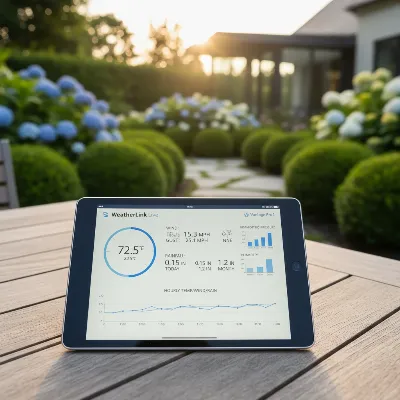
Owning a home weather station is an exciting way to connect with your environment, providing real-time data on everything from temperature and humidity to wind speed and rainfall. Whether you’re a seasoned meteorology enthusiast, a gardener planning for optimal planting conditions, or simply someone who appreciates precise local weather insights, the reliability of your station’s readings is paramount. Over time, even the most advanced sensors can experience drift due to environmental exposure, wear, or general atmospheric changes, leading to inaccurate data. This guide will walk you through the essential steps to safely and effectively calibrate your weather station at home, ensuring you receive the most precise and trustworthy information about your local conditions.
The Importance of Weather Station Calibration for Accurate Data
Calibration is the process of fine-tuning your weather station’s sensors to match known, accurate reference values. It’s about ensuring that the numbers you see on your display truly reflect the conditions outside your door. Without regular calibration, your weather station might provide misleading data, impacting your understanding of local weather patterns or critical decisions like irrigation schedules or outdoor activity planning.
Weather stations rely on various sensors, each susceptible to minor inaccuracies over time. For instance, temperature sensors can be affected by direct sunlight or proximity to heat sources, while humidity sensors can drift in extreme moisture or temperature conditions. Wind sensors might accumulate dirt or ice, and rain gauges can be affected by debris or improper leveling. Regular calibration addresses these issues, bringing your sensors back into alignment with reality and ensuring the integrity of your meteorological records.
Essential Tools and Safety Considerations Before You Begin
Before embarking on the calibration process, proper preparation is key. Gathering the right tools and understanding some fundamental safety guidelines will ensure a smooth and effective procedure.
Gathering Your Calibration Toolkit
Each sensor may require specific reference instruments or materials. Here’s what you’ll typically need:
- For Temperature: A certified liquid-in-glass thermometer (mercury or red spirit) is ideal. Avoid common digital thermometers or bi-metal dial thermometers, as they often have their own margin of error.
- For Humidity: A calibrated hygrometer or a salt-based calibration kit (using common table salt and water to create a stable 75% relative humidity environment).
- For Wind Speed and Direction: A portable reference anemometer and a compass for direction.
- For Rain: A measuring cup with precise increments (e.g., 1 cup or 100 ml), a plastic cup with a pinhole, and potentially a small screwdriver if your rain gauge has manual adjustment screws.
- For Barometric Pressure: Access to a reliable local weather source (like a nearby airport or official weather service website) for sea-level pressure readings, along with your station’s user manual.
- General: Your weather station’s user manual (crucial for specific model instructions), and possibly a level to ensure proper sensor mounting.
|
Our Picks for the Best Weather Station in 2026
As an Amazon Associate I earn from qualifying purchases.
|
||
| Num | Product | Action |
|---|---|---|
| 1 | WiFi Weather Station Wireless Indoor Outdoor, Thermometer with Rain Gauge and Wind Speed/Direction, Large Display for Weather Forecast, Temperature, Humidity, Clock, Alarm, UV, Air Pressure, Black |

|
| 2 | Sainlogic Smart WiFi Weather Station with 24H/7Days Accurate Weather Forecast by Weatherseed® AI, 8.5" Large Display,UV,Sun Light,Rain Gauge,Wind Gauge,2-Year Data Storage & Export, Only 2.4G |
|
| 3 | Ambient Weather WS-2000 Smart Weather Station with WiFi Remote Monitoring and Alerts |
|
| 4 | Sainlogic WiFi Smart Weather Station SA9 with 24H/ 7Days Accurate Weather Forecast by Weatherseed® AI, 8.5" Large Display,UV,Sun Light,Rain Gauge,Wind Gauge,2-Year Data Storage & Export(Only 2.4G) |
|
| 5 | 14-in-1 Wireless Weather Station with Outdoor Wireless Sensor,Radio-Controlled Clock,Rain Gauge,Wind Speed/Direction,Moon Phase,Wind Chill Index,Outdoor Dew Point,Barometer(NO WiFi) |
|
| 6 | Ambient Weather WS-2902 WiFi Smart Weather Station |
|
| 7 | Tempest Weather Station with Built-in Wind Meter, Rain Gauge, and Accurate Weather Forecasts, Wireless, App and Alexa Enabled |
|
| 8 | 10-in-1 Wireless Weather Station,with Outdoor Sensor,Rain Gauge,Atomic Clock,Wind Speed/Wind Direction,Indoor Temperature and Humidity,Barometer,Weather Forecast, etc.(NO WiFi) |
|
| 9 | Sainlogic Smart WiFi Weather Stations Wireless Indoor Outdoor SA68 Plus,24/7 AI Weather Forecast by Weatherseed®,APP/Email Alert,Home Weather Station with Rain Gauge,2-Year Data Storage(Only 2.4G) |
|
| 10 | AcuRite Iris (5-in-1) Indoor/Outdoor Wireless Weather Station for Indoor and Outdoor Temperature and Humidity, Wind Speed and Direction, and Rainfall with Digital Display (01512M) |
|
Prioritizing Safety and Best Practices
While calibrating a home weather station is generally safe, a few practices will ensure you protect yourself and your equipment:
- Read Your Manual: Always consult your weather station’s user manual first. It contains specific instructions for your model, including how to access calibration modes and any unique considerations.
- Stable Environment: When calibrating temperature and humidity sensors, bring them into a stable indoor environment, like your home, away from drafts, direct sunlight, or heat sources. This allows the sensors and your reference instruments to stabilize to the same conditions.
- Secure Placement: Ensure sensors are securely mounted and level, especially the rain gauge and wind sensors, before and after calibration.
- Avoid Over-Adjusting: Make small, incremental adjustments. It’s easy to over-correct if you rush. Patience is a virtue in calibration.
- Disconnect Power (If Applicable): For certain repairs or adjustments that involve opening sensor units, it might be prudent to temporarily disconnect power or remove batteries to prevent accidental damage.
Step-by-Step Guide to Calibrate Your Weather Station Sensors
The calibration process varies slightly for each sensor type. Here’s a general guide for the most common sensors:
Calibrating Your Temperature Sensor
Temperature readings can be easily skewed by external factors. To calibrate effectively:
- Bring Inside: Carefully bring your outdoor temperature sensor indoors to a stable environment.
- Reference Comparison: Place your certified liquid-in-glass thermometer next to the weather station’s temperature sensor. Ensure both are in the same air mass, away from direct light or heat sources.
- Stabilize: Allow both devices to stabilize for several hours, or even overnight, to ensure they’ve fully acclimated to the same temperature.
- Record and Adjust: Note the reading from your certified thermometer. Access the calibration settings on your weather station’s console or app (refer to your manual for specific button presses or menu navigation). Adjust your station’s temperature reading to match the certified thermometer. Most stations allow an offset adjustment in small increments.
Calibrating Your Humidity Sensor
Humidity sensors are known for drifting over time. The salt test is a popular and effective home method:
- Salt Solution: In a small, airtight container, mix about a tablespoon of plain table salt with a few drops of water to create a thick paste. Do not dissolve the salt completely.
- Enclosure: Place your weather station’s humidity sensor and a calibrated hygrometer (if you have one) into the airtight container, ensuring they don’t touch the salt paste.
- Stabilize: Seal the container and leave it undisturbed for at least 8-12 hours, preferably 24 hours. The enclosed environment will stabilize at approximately 75% relative humidity.
- Record and Adjust: After stabilization, compare your weather station’s humidity reading to 75% RH (or your reference hygrometer’s reading). Adjust the humidity offset on your weather station’s console or app until it matches the reference value.
Calibrating Your Wind Speed and Direction Sensors
Wind sensors require a clear, unobstructed environment for accurate readings:
- Reference Anemometer: If you have access to a portable reference anemometer, position it close to your weather station’s wind sensor in an open area, free from buildings or trees that could block wind flow.
- Compare Readings: On a calm day with a steady breeze, observe and compare the wind speed readings from both devices.
- Adjust Offset: Many stations allow a wind speed calibration factor or offset adjustment through their software. If your readings consistently differ, apply a small adjustment.
- Direction Alignment: For wind direction, ensure your sensor is physically aligned correctly, often pointing north, as per your manual. Some advanced stations allow a directional offset adjustment in their software.
> “Consistent and accurate wind data is crucial, especially for those in agriculture or anyone tracking localized microclimates. Small discrepancies can lead to significant misinterpretations.” – Dr. Eleanor Vance, Climatology Expert
Calibrating Your Rain Gauge
A rain gauge’s accuracy depends on its level placement and the proper functioning of its tipping bucket mechanism:
- Inspect and Clean: Before calibration, thoroughly inspect your rain gauge for any debris, leaves, or insect nests in the funnel or tipping mechanism. Clean it gently if necessary. Ensure the gauge is perfectly level.
- Known Water Volume Test: Using a precise measuring cup, slowly pour a known amount of water (e.g., 1 cup or 100 ml, depending on your manual’s recommendation) into the rain gauge. Pour slowly to simulate natural rainfall.
- Count Tips: As the water pours, you should hear the tipping mechanism “click.” Count the number of tips. Your manual should specify the expected number of tips for a given volume (e.g., 0.01 inches per tip).
- Adjust (if needed): If the recorded rainfall on your console doesn’t match the actual volume you poured, your rain gauge may need adjustment. Some models have small calibration screws beneath the tipping lever (adjust both evenly), while others allow software adjustments via the console or app. Repeat the test after adjustment to confirm accuracy.
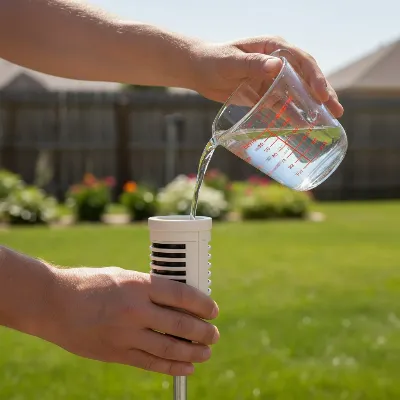 A person performing a rain gauge calibration at home, pouring water into a weather station sensor.
Calibrating Your Barometric Pressure Sensor
Barometric pressure needs to be corrected to sea level for meaningful comparison with official forecasts:
- Find Local Sea-Level Pressure: Identify a reliable source for current sea-level barometric pressure in your immediate area. Local airport weather reports or official weather service websites are excellent resources. Note your elevation if your station requires manual input for sea-level correction.
- Compare and Adjust: On a calm day, when pressure variations are minimal, compare your weather station’s reading (ensuring it’s set to “relative pressure” or “sea-level pressure” if applicable) with the official local value.
- Apply Offset: Access the barometer settings on your console or app and adjust the reading to match the reliable reference. Some stations can automatically correct for elevation if you input it, while others require manual offset adjustments.
Maintaining Accuracy: Beyond Initial Calibration
Calibration isn’t a one-time event. To ensure the long-term accuracy of your weather station, consider these ongoing maintenance tips:
- Regular Cleaning: Dust, dirt, spiderwebs, and bird droppings can significantly impair sensor performance. Regularly clean all sensors according to manufacturer guidelines.
- Optimal Placement: Periodically check that your weather station remains in its optimal location. Ensure temperature and humidity sensors are shaded, wind sensors are unobstructed, and the rain gauge is level and clear.
- Software and Firmware Updates: Keep your weather station’s software and firmware updated. Manufacturers often release updates that improve sensor accuracy or add new calibration options.
- Seasonal Checks: Perform a quick accuracy check on all sensors at least twice a year, perhaps at the beginning of spring and fall, or more frequently if you notice inconsistent readings.
Conclusion
Calibrating your home Weather Station is a rewarding process that significantly enhances the reliability and value of your weather data. By carefully comparing your sensors against trusted reference points and making precise adjustments, you ensure that your station provides the most accurate reflection of your local environment. This dedication to accuracy not only makes you a more informed weather observer but also empowers you to make better decisions influenced by the climate around you. So, how confident are you in the precision of your daily weather reports?