An inaccurate weather station can be frustrating, but many common issues can be resolved with practical steps. The primary reasons for inaccurate readings include improper installation, environmental factors like microclimates, neglected maintenance (dirt, debris, sensor degradation), and technical glitches such as wireless communication problems or power supply issues. Optimizing placement, regular cleaning, and periodic calibration are key to restoring precision.
Understanding the Root Causes of Weather Station Inaccuracies
Accurate weather data is essential for gardening, planning outdoor activities, or making critical agricultural decisions. Your weather station relies on a suite of sensitive sensors to gather this vital information. When these sensors provide readings that seem “off,” it’s often due to a combination of environmental factors, maintenance oversights, or technical hiccups. Identifying the specific cause is key to implementing an effective fix and ensuring your station provides the precise, real-time conditions of your unique environment.
Common Culprits: Installation and Environmental Factors
Even the most advanced weather station can struggle to provide accurate data if it’s not set up correctly or is battling its surroundings. The immediate environment plays a monumental role in sensor performance.
Improper Siting and Microclimates
One of the most frequent reasons for inaccurate readings stems from where your weather station is installed. Obstacles such as large buildings, dense trees, or fences can disrupt natural wind patterns, causing your anemometer to register lower or skewed wind speeds. Similarly, direct sunlight exposure or placement near reflective surfaces like concrete driveways or dark roofs can cause temperature sensors to read significantly higher than the actual air temperature. Heat radiating from dryer vents, air conditioning units, or even a hot wood deck can also create localized “microclimates” – small areas with atmospheric conditions notably different from the broader surroundings. These subtle yet powerful influences mean your station is accurately reporting its immediate microclimate, rather than the general conditions you’re interested in.
Extreme Weather Conditions
Weather stations are built to withstand the elements, but extreme conditions can push them beyond their operational limits. Prolonged exposure to very high or low temperatures can degrade sensor performance over time. Strong winds can interfere with rain gauge accuracy, causing rain to be under-collected as droplets are blown away or deflected. Freezing rain or heavy snow can immobilize moving parts like wind cups and vanes, leading to zero or incorrect wind readings until thawed. Such conditions highlight the importance of robust equipment and sometimes, temporary protective measures.
The Hidden Impact of Maintenance and Sensor Health
Beyond the installation, the ongoing health and cleanliness of your weather station’s components are paramount. Neglecting these aspects can lead to a gradual, insidious decline in accuracy.
Dirt, Debris, and Physical Obstructions
|
Our Picks for the Best Weather Station in 2026
As an Amazon Associate I earn from qualifying purchases.
|
||
| Num | Product | Action |
|---|---|---|
| 1 | WiFi Weather Station Wireless Indoor Outdoor, Thermometer with Rain Gauge and Wind Speed/Direction, Large Display for Weather Forecast, Temperature, Humidity, Clock, Alarm, UV, Air Pressure, Black |

|
| 2 | Sainlogic WiFi Smart Weather Station SA9 with 24H/ 7Days Accurate Weather Forecast by Weatherseed® AI, 8.5" Large Display,UV,Sun Light,Rain Gauge,Wind Gauge,2-Year Data Storage & Export(Only 2.4G) |
|
| 3 | Sainlogic Smart WiFi Weather Stations Wireless Indoor Outdoor SA68 Plus,24/7 AI Weather Forecast by Weatherseed®,APP/Email Alert,Home Weather Station with Rain Gauge,2-Year Data Storage(Only 2.4G) |
|
| 4 | 10-in-1 Wireless Weather Station,with Outdoor Sensor,Rain Gauge,Atomic Clock,Wind Speed/Wind Direction,Indoor Temperature and Humidity,Barometer,Weather Forecast, etc.(NO WiFi) |
|
| 5 | Ambient Weather WS-2902 WiFi Smart Weather Station |
|
| 6 | AcuRite Iris (5-in-1) Indoor/Outdoor Wireless Weather Station for Indoor and Outdoor Temperature and Humidity, Wind Speed and Direction, and Rainfall with Digital Display (01512M) |
|
| 7 | Tempest Weather Station with Built-in Wind Meter, Rain Gauge, and Accurate Weather Forecasts, Wireless, App and Alexa Enabled |
|
| 8 | 14-in-1 Wireless Weather Station with Outdoor Wireless Sensor,Radio-Controlled Clock,Rain Gauge,Wind Speed/Direction,Moon Phase,Wind Chill Index,Outdoor Dew Point,Barometer(NO WiFi) |
|
| 9 | Ambient Weather WS-2000 Smart Weather Station with WiFi Remote Monitoring and Alerts |
|
| 10 | Sainlogic Smart WiFi Weather Station with 24H/7Days Accurate Weather Forecast by Weatherseed® AI, 8.5" Large Display,UV,Sun Light,Rain Gauge,Wind Gauge,2-Year Data Storage & Export, Only 2.4G |
|
Your outdoor sensors are constantly exposed to dust, pollen, leaves, bird droppings, and insects. A clogged rain gauge funnel, for instance, will lead to under-reported rainfall. Dirt or spiderwebs on wind cups can impede their free rotation, resulting in inaccurate wind speed measurements. Over time, accumulated grime on temperature and humidity sensors can create an insulating layer, delaying response times or skewing readings. Regular cleaning is not just about aesthetics; it’s a critical part of maintaining sensor functionality.
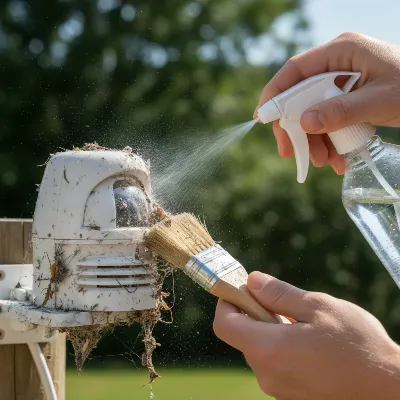 A close-up of a person cleaning a weather station sensor covered in dust and leaves with a soft brush and water, demonstrating careful maintenance.
Sensor Drift and Degradation
Even high-quality sensors aren’t immune to the relentless march of time and environmental exposure. Over months and years, sensor components can “drift” from their original factory calibration. Humidity sensors, for example, are particularly susceptible to chemical interactions with atmospheric gases, leading to a gradual loss of sensitivity and skewed readings. Temperature sensors can degrade under constant UV exposure. This natural aging process means that a sensor that was perfectly accurate when new may slowly become less reliable, necessitating periodic recalibration or, eventually, replacement.
Lack of Regular Calibration
Calibration is the process of fine-tuning your sensors to ensure they provide measurements that match a known standard. Without it, even minor manufacturing variances or environmental wear can accumulate into significant discrepancies. Many weather stations, especially those used for professional or serious amateur applications, allow for user calibration. If this process is neglected, sensors that have drifted due to exposure or age will continue to report inaccurate data, making the entire station unreliable. Think of it like tuning a musical instrument; without regular adjustments, it will gradually fall out of tune.
Technical Glitches: Connectivity, Power, and Software
Sometimes, the problem isn’t with the weather itself or the physical state of the sensors, but with the underlying technology that collects and transmits the data.
Wireless Communication Problems
Most modern home weather stations rely on wireless signals to transmit data from outdoor sensors to an indoor console. This wireless connection is susceptible to a variety of issues. If the outdoor sensor is too far from the console, or if there are significant obstructions like thick walls, concrete, or multiple floors between them, the signal can weaken or drop entirely. Interference from other electronic devices, such as Wi-Fi routers, cordless phones, or even microwave ovens, can also disrupt data transmission, leading to incomplete or erroneous readings.
Power Supply Issues
A weather station, like any electronic device, needs a stable power source to function correctly. Low or depleted batteries in either the outdoor sensor array or the indoor console can cause erratic behavior, including inaccurate readings, intermittent data transmission, or complete loss of communication. Solar-powered stations might struggle during extended periods of cloudy weather or short winter days, leading to undercharged batteries and subsequent performance issues. Checking battery health is often a simple yet overlooked troubleshooting step.
Software and Hardware Malfunctions
While less common, internal software bugs or hardware failures can also be sources of inaccuracy. Software glitches can cause the station to misinterpret sensor data, display incorrect values, or fail to log information properly. Mechanical failures, such as a worn bearing in a wind anemometer or a faulty circuit board in a sensor, can lead to consistent errors that cleaning or calibration alone cannot resolve. Regular firmware updates provided by the manufacturer can sometimes address software-related issues.
Quick Fixes: Bringing Your Weather Station Back to Accuracy
Don’t let inaccurate readings turn your enthusiasm into frustration. Many common issues can be resolved with a few practical steps.
Optimize Your Station’s Placement
Re-evaluating and optimizing your weather station’s location is often the most impactful quick fix.
- Temperature & Humidity: Mount these sensors about five feet (1.5 meters) above the ground, preferably over a grassy or natural surface rather than concrete. Ensure they are in a shaded area, away from direct sunlight, reflective surfaces, and any artificial heat or moisture sources like vents or swimming pools. If your station doesn’t have an integrated radiation shield, consider adding a DIY shield to protect the temperature sensor from solar radiation.
- Wind Speed & Direction: Position the anemometer as high as possible, ideally 10 meters (33 feet) above ground level and clear of any obstructions like buildings or trees. The general rule is to maintain a horizontal distance from obstructions of at least 10 times the height of the obstruction to ensure accurate wind flow.
- Rain Gauge: Place the rain gauge in an open, unobstructed area, typically 2-4 feet (0.6-1.2 meters) above the ground, ensuring no overhead structures or tall vegetation interfere with rainfall collection.
Master the Art of Cleaning and Maintenance
A clean station is a happy station. Regular cleaning can prevent many accuracy issues.
- Rain Gauges: Regularly clear the funnel of leaves, dirt, or debris. For tipping bucket mechanisms, ensure the bucket pivots freely and is clean. You can test its accuracy by slowly pouring a known volume of water (e.g., 54.4ml for a 0.2mm per tip gauge should result in 10 tips) to verify its function.
- Wind Sensors: Check wind cups and vanes for obstructions like spiderwebs, dirt, or ice. Ensure they rotate freely and smoothly. If movable parts are stiff in freezing conditions, a small spray of penetrating fluid might help.
- Temperature & Humidity Sensors: Gently wipe down sensor housings to remove accumulated dust or grime. Ensure any radiation shields are also clean and free of debris.
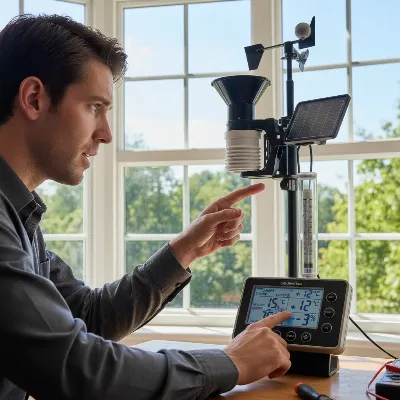 A person performing calibration on a home weather station, adjusting settings on the console while comparing with a reference thermometer placed next to the outdoor sensor.
Regular Calibration for Reliable Data
Calibration brings your sensors back into alignment with known standards.
- Temperature & Humidity: Place a certified reference thermometer and hygrometer next to your weather station’s outdoor sensor in the shade. Allow them to stabilize for at least 30 minutes. If your station allows, adjust the readings on your console to match the reference instruments. Many stations have a manual offset function in their settings.
- Wind Speed & Direction: For wind direction, ensure the wind vane is correctly oriented (e.g., north is truly north). For wind speed, a direct comparison requires a professional anemometer, but ensuring the sensor is unobstructed and well-maintained is the best first step. Some advanced stations offer calibration factors that can be adjusted.
- Rain Gauge: Perform the water test described above. If your gauge allows for manual adjustment via a screw, you can fine-tune it to match the expected output.
- Barometric Pressure: To calibrate pressure, find your current local sea-level pressure from a reliable source like a nearby official airport weather station or a trusted online meteorological service. Access your station’s barometer settings and adjust the reading to match this reference value. It’s often best to do this on a calm, clear day for the most stable comparison.
Troubleshooting Connectivity and Power
Addressing communication and power issues can often be a quick fix.
- Resetting and Re-synchronizing: If you’re experiencing intermittent or no outdoor readings, bring your outdoor sensor within a few feet (1-3 meters) of the indoor console. Remove all batteries from both units, let them sit for about 20 minutes to fully drain any residual power, then reinsert new batteries, following the manufacturer’s specified order. Allow 2-3 hours for a full re-synchronization.
- Replacing Batteries: Always replace batteries in both the outdoor sensor and indoor console if readings are erratic or transmission is inconsistent. Use high-quality, fresh batteries.
- Checking Wiring: For wired stations or those with separate components, inspect all wiring connections for looseness, corrosion, or physical damage.
- Minimizing Interference: Move your indoor console or outdoor sensors away from potential sources of electromagnetic interference, such as computers, Wi-Fi routers, or other electronic devices.
Software Updates and System Resets
Keeping your station’s internal software up-to-date can resolve many hidden issues.
- Keeping Firmware Current: Check your manufacturer’s website for any available firmware or software updates for your specific model. These updates often include bug fixes and performance improvements.
- When a Full System Reset is Needed: If all other troubleshooting steps fail, a full factory reset (as per your user manual) can often resolve persistent software-related inaccuracies or communication issues. Be aware that this will likely erase any stored data and custom settings.
When to Consider Professional Help or Replacement
While many issues are solvable with DIY fixes, there are times when your station might need more significant intervention. Persistent, unresolvable inaccuracies despite thorough troubleshooting, or obvious physical damage to critical sensors, might warrant contacting the manufacturer’s support or a professional repair service. If your weather station is very old, consistently underperforms, or lacks the features and accuracy you now need, it might be time to invest in a newer, more reliable model. Technological advancements have brought increasingly accurate and robust options to the market.
Conclusion
An inaccurate weather station can quickly diminish the value it brings to your daily life or specific projects. However, by understanding the common causes—ranging from improper siting and environmental factors to maintenance neglect and technical glitches—you are well-equipped to restore its precision. Proactive steps such as optimizing placement, adhering to a regular cleaning schedule, performing periodic calibrations, and troubleshooting connectivity issues can dramatically improve your station’s reliability. Don’t let inconsistent data deter you; embrace the process of maintaining your weather station, and it will continue to serve as a valuable window into your local atmospheric conditions. What is one quick fix you plan to try on your weather station this week to improve its accuracy?
Frequently Asked Questions
Frequently Asked Questions
Why are my temperature readings consistently too high?
Consistently high temperature readings are most often caused by improper siting, such as direct sunlight exposure or proximity to heat-retaining surfaces like concrete. Relocating the sensor to a shaded area, preferably 5 feet above a grassy surface, and away from artificial heat sources, can significantly improve accuracy.
How often should I calibrate my weather station?
For most home weather stations, a yearly check and recalibration for key sensors like temperature and humidity is a good practice. High-quality or professional stations might need more frequent checks, especially if they are in harsh environments or if you notice consistent discrepancies in readings.
Can my neighbor's weather station interfere with mine?
Generally, it is highly unlikely that your neighbor's weather station will interfere with yours. Most home weather stations use proprietary frequencies or established wireless protocols designed to minimize interference. Communication issues are more often due to distance, physical obstructions, or interference from your own household electronics.
What is a microclimate and how does it affect my readings?
A microclimate refers to localized atmospheric conditions that differ from those in the surrounding area, often due to specific geographical features or human-made structures. For example, a concrete patio retains heat, creating a warmer microclimate. Your weather station accurately reports the conditions of its immediate microclimate, so careful siting helps mitigate discrepancies with broader forecasts.
How can I improve my wind speed accuracy?
To improve wind speed accuracy, ensure your anemometer is installed as high as possible, ideally 10 meters (33 feet) above ground, and completely free of obstructions like buildings or trees. Regular cleaning of the wind cups and ensuring they rotate freely without obstruction or stiff bearings also helps maintain precision.
Fix Inaccurate Weather Station Readings
Follow these steps to troubleshoot and improve the accuracy of your home weather station's data.
Mount temperature and humidity sensors about 5 feet (1.5 meters) above ground in a shaded area, away from direct sunlight or heat sources. Position the anemometer 10 meters (33 feet) high, clear of obstructions, and place the rain gauge 2-4 feet (0.6-1.2 meters) above ground in an open area.
Regularly clear rain gauge funnels of debris and ensure tipping buckets pivot freely. Check wind cups and vanes for obstructions like spiderwebs or dirt, ensuring smooth rotation. Gently wipe down temperature and humidity sensor housings and radiation shields to remove grime.
For temperature and humidity, compare readings with a certified reference instrument and adjust your station's console if it allows. For rain gauges, perform a water test with a known volume (e.g., 54.4ml for 10 tips). Calibrate barometric pressure by matching it to a local official sea-level pressure source on a calm day.
If readings are intermittent, bring the outdoor sensor close to the console, remove all batteries for 20 minutes, then reinsert new batteries and allow 2-3 hours for re-synchronization. Replace old batteries in both units and inspect wiring for wired stations. Move units away from Wi-Fi routers or other electronic interference sources.
Check your manufacturer's website for firmware updates, which often include bug fixes. If all other steps fail, perform a full factory reset as per your user manual to resolve persistent software or communication issues, noting this will erase stored data.

I was pulling my hair out trying to figure out why my wind readings were so erratic. The tip about checking for environmental factors, specifically nearby obstructions creating microclimates, was a game-changer. Moved my anemometer a few feet higher and away from a large tree, and now it’s spot on. So glad I didn’t just buy a new one!
I’ve been having trouble with my wireless communication dropping out, and I tried all the suggested fixes like checking battery levels and signal interference. It helped a little, but I still get occasional gaps in data. I think my unit might just be older and struggling with range, even after trying to optimize placement. It’s better, but not perfect.
My temperature sensor started giving really high readings, especially in the afternoon. I followed the advice on regular cleaning and found a surprising amount of dust and spiderwebs on the housing. A quick wipe-down made a huge difference. It’s back to being accurate, though I wish the initial setup instructions had emphasized maintenance more.
My rain gauge was totally off, showing way less rain than we actually got. Turns out, the issue was neglected maintenance – a tiny leaf had gotten stuck in the funnel. After a quick clean, it’s working perfectly. It’s amazing how such a small thing can throw off an entire sensor. Definitely keeping up with the cleaning schedule now!