Replacing the battery in your weather station is a straightforward maintenance task that ensures continuous, accurate data collection. When your weather station displays blank screens, loses connection, or shows intermittent readings, a low battery is often the cause. This guide provides a step-by-step process for replacing batteries in both indoor consoles and outdoor sensors, helping maintain your device’s accuracy and extending its lifespan.
Understanding Your Weather Station’s Power Needs
Weather stations typically consist of an indoor display console and one or more outdoor sensor arrays. Both components often rely on batteries, though the indoor console might also use an AC adapter. Outdoor sensors, which constantly monitor conditions like temperature, humidity, wind, and rain, are almost always battery-powered for flexible placement. These batteries are crucial for wirelessly transmitting data back to your indoor console.
Signs of a low battery can vary by model but commonly include intermittent readings, a blank or dim display on the console, a sudden loss of connection to outdoor sensors, or a specific low-battery icon appearing on the screen. Regular battery replacement is essential for consistent performance and accurate data. Neglecting dead batteries can sometimes lead to corrosion within the compartment, potentially damaging the device. Proactive replacement ensures uninterrupted operation, especially if you rely on your station for critical weather monitoring.
Identifying the Correct Battery Type
Before attempting any replacement, it’s vital to identify the correct battery type for both your indoor console and any outdoor sensors. Most weather stations use common battery sizes, but variations exist. Always check your device’s user manual first, as it will specify the exact battery type (e.g., AA, AAA, C, D, or sometimes coin cell batteries like CR2032) and the number of batteries required for each component.
If the manual isn’t available, you can usually find this information printed inside the battery compartment cover or on a label on the device itself. Common choices include alkaline batteries, which are widely available and cost-effective for general use. For devices exposed to colder temperatures, lithium batteries are often recommended as they perform better in extreme cold and typically offer a longer lifespan, though they come at a higher cost. Rechargeable batteries can also be an option for some models, but always verify compatibility to avoid potential issues with voltage or charging cycles not suited for your station.
Step-by-Step Guide to Replacing Your Weather Station Battery
Replacing the batteries in your weather station is a straightforward process, but following a careful step-by-step approach ensures a smooth and successful operation. This guide covers both the indoor console and the outdoor sensor array, as both are critical to your station’s functionality.
Preparation and Safety Precautions
|
Our Picks for the Best Weather Station in 2026
As an Amazon Associate I earn from qualifying purchases.
|
||
| Num | Product | Action |
|---|---|---|
| 1 | AcuRite Iris (5-in-1) Indoor/Outdoor Wireless Weather Station for Indoor and Outdoor Temperature and Humidity, Wind Speed and Direction, and Rainfall with Digital Display (01512M) |

|
| 2 | Tempest Weather Station with Built-in Wind Meter, Rain Gauge, and Accurate Weather Forecasts, Wireless, App and Alexa Enabled |
|
| 3 | Sainlogic WiFi Smart Weather Station SA9 with 24H/ 7Days Accurate Weather Forecast by Weatherseed® AI, 8.5" Large Display,UV,Sun Light,Rain Gauge,Wind Gauge,2-Year Data Storage & Export(Only 2.4G) |
|
| 4 | Sainlogic Smart WiFi Weather Station with 24H/7Days Accurate Weather Forecast by Weatherseed® AI, 8.5" Large Display,UV,Sun Light,Rain Gauge,Wind Gauge,2-Year Data Storage & Export, Only 2.4G |
|
| 5 | WiFi Weather Station Wireless Indoor Outdoor, Thermometer with Rain Gauge and Wind Speed/Direction, Large Display for Weather Forecast, Temperature, Humidity, Clock, Alarm, UV, Air Pressure, Black |
|
| 6 | Sainlogic Smart WiFi Weather Stations Wireless Indoor Outdoor SA68 Plus,24/7 AI Weather Forecast by Weatherseed®,APP/Email Alert,Home Weather Station with Rain Gauge,2-Year Data Storage(Only 2.4G) |
|
| 7 | Ambient Weather WS-2000 Smart Weather Station with WiFi Remote Monitoring and Alerts |
|
| 8 | 10-in-1 Wireless Weather Station,with Outdoor Sensor,Rain Gauge,Atomic Clock,Wind Speed/Wind Direction,Indoor Temperature and Humidity,Barometer,Weather Forecast, etc.(NO WiFi) |
|
| 9 | 14-in-1 Wireless Weather Station with Outdoor Wireless Sensor,Radio-Controlled Clock,Rain Gauge,Wind Speed/Direction,Moon Phase,Wind Chill Index,Outdoor Dew Point,Barometer(NO WiFi) |
|
| 10 | Ambient Weather WS-2902 WiFi Smart Weather Station |
|
Before you begin, gather the necessary tools. You’ll typically need a small Phillips head screwdriver (for compartments secured with screws), the new batteries of the correct type and quantity, and possibly a soft cloth or cotton swab for cleaning. Always turn off your weather station console if it has a power button, or unplug it from the AC adapter before opening any battery compartments. Ensure you are working in a dry environment to protect the electronic components. For outdoor sensors, it’s best to bring them indoors or at least work in a sheltered spot to prevent moisture from entering.
Locating the Battery Compartment
The battery compartments for your weather station components are usually easy to find.
- Indoor Console: For the main display console, the battery compartment is almost always located on the back panel. It might be a simple slide-off cover or secured with one or two small screws.
- Outdoor Sensor Array: Locating the battery compartment on the outdoor sensor array can vary more by model.
- All-in-one units: For integrated units (which combine an anemometer, rain gauge, and thermometer into one), the compartment is often found on the underside or side of the main housing, sometimes protected by a rubber gasket or a twist-off cap.
- Separate sensors: If your station has separate sensors for wind, rain, and temperature, each one will have its own battery compartment. The temperature/humidity sensor often has its compartment on the back or bottom, while the anemometer (wind sensor) or rain gauge might have it hidden near the mounting pole or under a cap.
Removing the Old Batteries
Once you’ve located the compartment, carefully open it. If it’s screwed shut, use your screwdriver. Note the orientation of the old batteries as you remove them – this will help ensure you insert the new ones correctly. Pay attention to the positive (+) and negative (-) terminals. If you notice any signs of corrosion (a white, powdery, or crusty substance), gently clean it with a cotton swab lightly dampened with white vinegar, then dry thoroughly before inserting new batteries. Always dispose of old batteries responsibly according to local regulations.
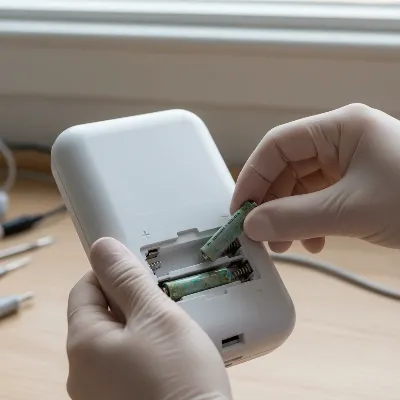 Technician carefully removing old batteries from a weather station console, showing proper orientation and battery compartment.
Inserting New Batteries
Now, insert the new batteries, making sure to match the correct polarity. The positive (+) end should align with the positive indicator in the compartment, and the negative (-) end with the negative indicator. Incorrect insertion can prevent the device from powering on and may even cause damage. Once all new batteries are in place, securely close the compartment cover. If it was screwed, gently tighten the screws, being careful not to overtighten and strip the threads. For outdoor sensors with rubber gaskets, ensure the gasket is properly seated to maintain weather resistance.
Re-synchronizing Your Weather Station
After replacing the batteries, especially in the outdoor sensor, your weather station will likely need to re-establish communication.
- Power On: If you unplugged or turned off your indoor console, power it back on.
- Clear Data (Optional but Recommended): Some consoles have a “clear” or “reset” button that can be pressed to clear any stored data and prepare for re-sync. Consult your manual for this step.
- Initiate Search: The console will typically automatically search for the outdoor sensor within a few minutes. Many models have a “search” or “receive” button that you can press and hold for a few seconds to manually initiate a search for the outdoor unit.
- Proximity: For the initial re-sync, it can be helpful to bring the outdoor sensor closer to the indoor console, even placing them side-by-side. This ensures a strong signal during the re-connection process.
- Wait: Allow several minutes for the console to detect and connect with the outdoor sensor. You should see the outdoor data (temperature, humidity, etc.) appear on your display. If it doesn’t connect after 5-10 minutes, try repeating the steps, ensuring batteries are correctly inserted and the outdoor sensor is within range.
Troubleshooting Common Post-Replacement Issues
Even with careful replacement, you might encounter a few issues. Don’t worry, most are easily resolved.
If your station isn’t powering on after new batteries, double-check the battery polarity (+/-). Ensure the batteries are fresh and fully charged, and that all battery compartment covers are securely closed. For consoles with an AC adapter, ensure it’s plugged in correctly.
A loss of outdoor sensor signal is common if re-synchronization wasn’t successful. Try bringing the sensor closer to the console and pressing the re-sync button again. Obstructions like thick walls or metal objects between the sensor and console can interfere with the signal; consider repositioning them. Sometimes, a full reset of both the console and the outdoor sensor (removing all batteries from both for a few minutes, then reinserting them and re-syncing) can resolve persistent connection issues.
Incorrect readings after battery replacement, especially from outdoor sensors, might indicate a sensor issue or a poor connection. Ensure the sensor is placed in an appropriate location, away from direct sunlight (for temperature readings) or obstructions (for wind and rain). If the problem persists, the sensor itself might be faulty, or there could be a firmware issue requiring a more advanced reset procedure as detailed in your user manual.
Tips for Extending Battery Life
Maximizing the lifespan of your weather station batteries can save you time and money. One of the most effective tips is to use quality batteries from reputable brands. While generic batteries might be cheaper, they often have a shorter life and can be more prone to leakage, which can damage your device. Consider using lithium batteries for outdoor sensors, especially in colder climates, as they offer superior performance and longevity in extreme temperatures.
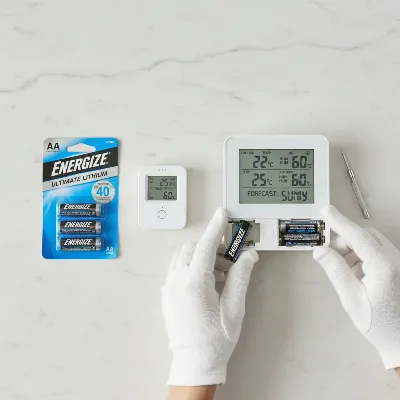 Close-up of new batteries and weather station components, emphasizing maintenance and battery care.
Avoiding extreme temperatures for your outdoor sensors can also help. While they are designed to be weather-resistant, prolonged exposure to scorching heat or freezing cold can degrade battery performance faster. If possible, choose a partially shaded location that still allows for accurate readings. Finally, regularly check your battery levels. Many modern weather stations display a low-battery indicator, but a quick visual inspection every few months, especially before seasonal changes, can help you replace batteries proactively before they die completely, ensuring continuous and accurate weather monitoring.
Conclusion
Replacing the battery in your weather station is a routine maintenance task that is essential for its long-term accuracy and reliability. By understanding the different battery types, following a careful step-by-step replacement process, and knowing how to troubleshoot common issues, you can ensure your weather station continues to provide valuable local weather data without interruption. Proactive battery care, including using quality batteries and performing regular checks, will not only extend battery life but also preserve the integrity of your device. With these simple steps, you can keep your personal weather station running smoothly, allowing you to stay informed about the ever-changing conditions right outside your door.
What specific challenges have you faced when maintaining your weather station, and how have you overcome them?
Frequently Asked Questions
Frequently Asked Questions
What are the common signs that my weather station battery needs replacing?
Common signs include a blank or dim display on the indoor console, intermittent data readings, a sudden loss of connection to outdoor sensors, or a specific low-battery icon appearing on the console screen. Timely replacement is crucial to avoid data gaps and ensure continuous monitoring.
Can I use rechargeable batteries in my weather station?
It depends on your specific weather station model. While some stations are compatible with rechargeable batteries, it's essential to check your user manual to ensure proper voltage and charging capabilities. Incompatible batteries might not provide sufficient power or could damage the device.
How often should I replace the batteries in my outdoor weather sensors?
The frequency depends on battery type, climate, and sensor activity. For standard alkaline batteries, replacement is typically needed every 6-12 months. Lithium batteries, especially in cold environments, can last longer, often 1-2 years. Regular checks and monitoring the low-battery indicator are recommended.
What should I do if my weather station isn't syncing after battery replacement?
First, ensure new batteries are inserted correctly in both the console and sensor, paying attention to polarity. Bring the outdoor sensor closer to the console and try manually initiating a re-sync process (refer to your manual for specific steps). A full reset (removing batteries from both units for a few minutes) can often resolve persistent syncing issues.
Can old batteries damage my weather station?
Yes, old or depleted batteries can sometimes leak corrosive fluids that can severely damage the electronic components and contacts within the battery compartment. This damage can lead to permanent malfunction of the weather station. Always dispose of old batteries promptly and clean any corrosion immediately.
Replace Your Weather Station Battery
Follow these steps to replace batteries in your weather station's indoor console and outdoor sensors, ensuring accurate and continuous operation.
Collect a small Phillips head screwdriver, new batteries of the correct type (e.g., AA, AAA, C, D, or CR2032), and a soft cloth. Turn off or unplug your weather station console and work in a dry environment. Bring outdoor sensors indoors for replacement.
Find the battery compartment on the back panel of your indoor console. For outdoor sensors, check the underside or side of all-in-one units, or the back/bottom of separate wind, rain, or temperature sensors. Some compartments may be secured with screws or twist-off caps.
Carefully open the compartment, using a screwdriver if necessary. Note the orientation of the old batteries (positive and negative terminals) before removing them. If corrosion is present, gently clean it with a cotton swab lightly dampened with white vinegar, then dry thoroughly. Dispose of old batteries responsibly.
Insert the new batteries, ensuring correct polarity by matching the positive (+) and negative (-) ends with the indicators in the compartment. Incorrect insertion can prevent power-on or cause damage. Securely close the compartment cover, tightening screws gently if applicable, and ensure rubber gaskets are properly seated for outdoor sensors.
After replacing batteries, power on your indoor console. You may optionally clear data via a reset button. The console should automatically search for the outdoor sensor; if not, manually initiate a search. For initial re-sync, place the outdoor sensor closer to the console and allow several minutes for connection. If issues persist, repeat steps or perform a full reset.

My weather station started displaying blank screens, and I was dreading having to buy a whole new one. This guide walked me through the process of replacing the battery, and it was much simpler than I expected. My station is working perfectly again, and I saved a lot of money by not having to replace the entire unit. Great advice!
I was getting so frustrated with my outdoor sensor constantly losing connection, and I thought it was broken. This guide was a lifesaver! Following the steps to replace the battery in the outdoor unit was super easy, and now my wind and rain readings are back to being perfectly consistent. Definitely recommend checking your batteries first if you’re having issues.
The instructions were clear for replacing the battery in my indoor console, which was showing intermittent readings. It fixed the problem, but I wish there was more specific advice on what type of batteries to use for different brands. I had to do a bit of extra searching to make sure I got the right ones for my AcuRite station.
Good breakdown of how to handle both indoor and outdoor components. I appreciated the reminder that outdoor sensors are almost always battery-powered, which is where I usually forget to check. My temperature and humidity data is much more reliable now after a quick battery swap. Solid tips for basic maintenance.