To keep your weather station running accurately, consistent maintenance is essential, involving regular cleaning of sensors, checking power sources, and inspecting physical components. Environmental factors like dust, pollen, and extreme weather can significantly impact performance, leading to skewed readings if not addressed. Adhering to a seasonal maintenance schedule ensures your station provides reliable data year-round, transforming your backyard into a precise meteorological hub.
Why Regular Weather Station Maintenance is Crucial
Maintaining your weather station isn’t merely a suggestion; it’s a fundamental practice for anyone who relies on its data. Over time, environmental factors can severely impact performance, leading to skewed readings and ultimately undermining the station’s purpose. Consistent upkeep ensures that every measurement, from a gentle breeze to a heavy downpour, is captured with unwavering accuracy.
Beyond just precision, diligent maintenance significantly prolongs the lifespan of your investment. Think of it as preventative healthcare for your outdoor electronics. Addressing minor issues like accumulated debris or corroded battery contacts early on can prevent more significant, costly damage down the line. It safeguards your sensors from premature wear and tear, ensuring that your weather station continues to deliver optimal performance season after season without unexpected failures.
Key Components Requiring Regular Attention
To maintain peak performance, focus your attention on the critical components of your weather station that are most susceptible to wear and environmental impact. Each part plays a vital role in data collection and requires specific care.
Sensors (Temperature, Humidity, Wind, Rain, Solar)
The sensors are the “eyes and ears” of your weather station, making their cleanliness and calibration absolutely paramount for accurate readings. Dust, pollen, insect nests, bird droppings, and even spider webs can obstruct these sensitive components, leading to inaccurate data. For instance, a clogged rain funnel will misrepresent rainfall, while a dusty radiation shield can cause erroneous temperature readings due to inhibited airflow.
Regularly clean all sensors using a soft cloth or a small, soft toothbrush. For stubborn grime, a solution of mild detergent and warm water can be effective, followed by a thorough rinse with clean water and air drying. A compressed air canister is excellent for dislodging debris from hard-to-reach crevices without causing damage. Always consult your manufacturer’s manual for specific cleaning instructions, as some sensors may require particular care. Beyond cleaning, calibration is essential. This process resets the sensor’s reference points, ensuring its readings align with true values. Many manuals provide calibration guidance, and it’s especially important to perform this after extreme weather events or if you notice consistent discrepancies in data.
Power Source (Batteries & Solar Panels)
|
Our Picks for the Best Weather Station in 2026
As an Amazon Associate I earn from qualifying purchases.
|
||
| Num | Product | Action |
|---|---|---|
| 1 | Sainlogic Smart WiFi Weather Station with 24H/7Days Accurate Weather Forecast by Weatherseed® AI, 8.5" Large Display,UV,Sun Light,Rain Gauge,Wind Gauge,2-Year Data Storage & Export, Only 2.4G |

|
| 2 | WiFi Weather Station Wireless Indoor Outdoor, Thermometer with Rain Gauge and Wind Speed/Direction, Large Display for Weather Forecast, Temperature, Humidity, Clock, Alarm, UV, Air Pressure, Black |
|
| 3 | Tempest Weather Station with Built-in Wind Meter, Rain Gauge, and Accurate Weather Forecasts, Wireless, App and Alexa Enabled |
|
| 4 | Ambient Weather WS-2000 Smart Weather Station with WiFi Remote Monitoring and Alerts |
|
| 5 | Sainlogic Smart WiFi Weather Stations Wireless Indoor Outdoor SA68 Plus,24/7 AI Weather Forecast by Weatherseed®,APP/Email Alert,Home Weather Station with Rain Gauge,2-Year Data Storage(Only 2.4G) |
|
| 6 | Sainlogic WiFi Smart Weather Station SA9 with 24H/ 7Days Accurate Weather Forecast by Weatherseed® AI, 8.5" Large Display,UV,Sun Light,Rain Gauge,Wind Gauge,2-Year Data Storage & Export(Only 2.4G) |
|
| 7 | Ambient Weather WS-2902 WiFi Smart Weather Station |
|
| 8 | 14-in-1 Wireless Weather Station with Outdoor Wireless Sensor,Radio-Controlled Clock,Rain Gauge,Wind Speed/Direction,Moon Phase,Wind Chill Index,Outdoor Dew Point,Barometer(NO WiFi) |
|
| 9 | 10-in-1 Wireless Weather Station,with Outdoor Sensor,Rain Gauge,Atomic Clock,Wind Speed/Wind Direction,Indoor Temperature and Humidity,Barometer,Weather Forecast, etc.(NO WiFi) |
|
| 10 | AcuRite Iris (5-in-1) Indoor/Outdoor Wireless Weather Station for Indoor and Outdoor Temperature and Humidity, Wind Speed and Direction, and Rainfall with Digital Display (01512M) |
|
Your weather station’s functionality hinges on a reliable power supply. For battery-powered units, regularly check the battery levels in all components, including the display unit and remote sensors. Weak or corroded batteries are a common cause of inaccurate readings, intermittent data transmission, or complete system failures. Replace batteries proactively, and for stations operating in colder climates, consider using lithium batteries, which offer superior performance in low temperatures. Always inspect battery contacts for corrosion and clean them if necessary.
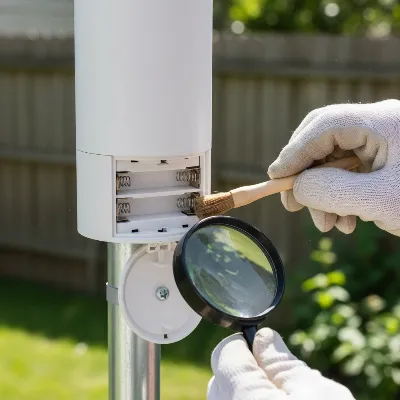 Checking and replacing batteries in an outdoor weather station
For stations equipped with solar panels, their efficiency directly impacts battery charging and overall power stability. Over time, solar panels can accumulate dust, dirt, pollen, and even bird droppings, which reduce their ability to convert sunlight into energy. Periodically wipe down your solar panels with a soft, damp cloth or an alcohol wipe to keep them clear and ensure optimal charging. This simple step maximizes the life of your rechargeable batteries and guarantees continuous data collection.
Physical Structure & Mounting
The structural integrity and secure mounting of your weather station are critical for its stability and the accuracy of its readings, especially in adverse weather conditions. Strong winds and storms can jostle loose components, affecting everything from wind direction readings to data transmission. Routinely inspect all mounting brackets, poles, and hardware for any signs of damage, corrosion, or loosening. Tighten any screws or bolts that appear slack, ensuring the station remains firmly anchored and vertical.
Examine all cables and wires for signs of wear, fraying, or damage from UV exposure or wildlife. Ensure that all connections are secure and free from moisture intrusion. The radiation shield, which protects temperature and humidity sensors from direct sunlight, needs to be kept clean of dust and debris to allow for proper airflow. For the rain gauge, regularly clear the funnel of any leaves, seeds, insects, or other obstructions that could block water flow. Also, check the tipping mechanism inside the gauge to ensure it moves freely and that the gauge itself is level for accurate precipitation measurements. Finally, for wind vanes and anemometers, ensure they are clean and can spin freely without obstruction from dirt or insect webbing, which can skew wind speed and direction readings.
Seasonal Maintenance Schedule for Optimal Performance
Adapting your maintenance routine to the changing seasons will provide targeted protection and ensure your weather station remains accurate year-round, regardless of the elements.
Spring Readiness: Cleaning and Inspection
As winter recedes and spring brings pollen, new growth, and sometimes heavy rains, your weather station requires a thorough clean and inspection. This is the ideal time to clear any accumulated debris. Pay special attention to the rain funnel, removing leaves, seeds, pollen, or insects that may have settled there over winter. Inspect the tipping mechanism of your rain gauge to confirm it moves freely and is free from obstructions.
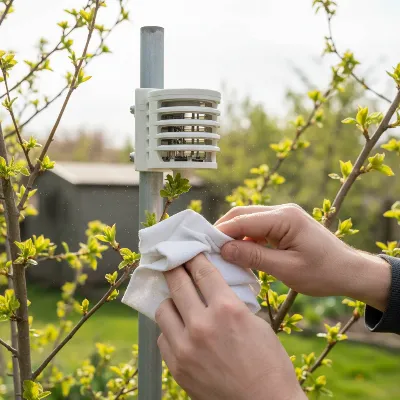 Cleaning outdoor weather station sensors and clearing debris in spring
Wipe down the radiation shield to remove any dust or buildup, ensuring air can circulate freely around the temperature and humidity sensors. The temperature swings and winds common in spring can loosen hardware, so take this opportunity to tighten all mounting screws and bolts. Lastly, compare your station’s readings for temperature and humidity with a trusted local source to confirm accuracy; significant discrepancies may signal the need for calibration or further inspection.
Summer Care: Battling Heat and Storms
Summer brings intense heat, powerful thunderstorms, and high humidity, all of which can place extra strain on your weather station. During this season, inspect batteries more frequently, checking contacts for corrosion and replacing any that show signs of fading power, as heat can sometimes accelerate battery drain.
Keep your solar panels clear of dust, pollen, or bird droppings to ensure they are working at peak efficiency to charge your internal batteries. Summer storms often involve strong winds, so double-check that your mounts are secure and your station is firmly anchored to withstand buffeting. If your temperature readings seem unusually high, it might indicate that your station is too close to heat-trapping surfaces like rooftops or concrete, in which case relocation might be beneficial.
Winter Preparation: Protecting Against the Cold
Preparing your weather station for winter is crucial for its survival and continued accuracy in freezing conditions. Cold weather can significantly diminish battery life, so it’s advisable to check battery levels frequently and consider swapping to fresh lithium batteries, which perform better in low temperatures.
Ensure that snow and ice are regularly brushed off from solar panels, radiation shields, and all sensors, especially the rain gauge and wind vanes, to prevent blockages or damage. After severe ice storms, inspect all mounting brackets and cables for damage or loosening caused by the weight of ice. Clearing snow and ice ensures sensors can function correctly and that solar panels can still harvest any available sunlight to keep your station powered.
Tools and Best Practices for Effective Maintenance
Having the right tools and adopting smart practices can make weather station maintenance much simpler and more effective. A basic kit should include soft cloths (microfiber is ideal), a mild, non-abrasive detergent, a small soft toothbrush, and a compressed air canister. For solar panels, alcohol wipes can be particularly useful for stubborn grime. Always keep your manufacturer’s manual handy; it’s an invaluable resource for specific instructions on cleaning, calibration, and troubleshooting your particular model.
Regularly update your weather station’s software or firmware, especially for wireless and internet-connected models. These updates often include performance enhancements, bug fixes, and new features that can improve accuracy and connectivity. Preventing pests is another smart practice; sometimes, spiders or insects can build nests inside support poles or radiation shields. While you should never seal the temperature/humidity shield, you can cover holes in support poles with duct tape or silicone sealer to deter unwelcome inhabitants, ensuring sensors remain unobstructed.
> “A consistent maintenance routine is the backbone of reliable weather data. Skipping these steps is like driving a car without oil changes – you might get by for a while, but eventually, performance will suffer, and costly repairs will become inevitable.” – Johnathan Davies, Senior Meteorologist and IoT Weather Specialist
How often should I clean my weather station sensors?
Ideally, you should clean your weather station sensors every 1-3 months, especially during seasons with high pollen, dust, or heavy precipitation. After extreme weather events, a quick check and clean is also highly recommended to ensure no debris has accumulated and affected readings. This routine helps prevent buildup that can skew data.
What kind of batteries are best for cold weather?
For optimal performance in cold weather, lithium batteries are highly recommended. They are designed to operate more efficiently at lower temperatures compared to standard alkaline batteries, which can lose power rapidly when it gets chilly. Always check your manufacturer’s recommendations for specific battery types and sizes.
Can I use household cleaners on my weather station?
It is generally best to avoid harsh household cleaners on your weather station. Most sensors and plastic components are sensitive and can be damaged by abrasive chemicals. Stick to a mild detergent mixed with warm water or simply clean water. Always wipe down with a soft cloth and rinse thoroughly.
Conclusion
A well-maintained weather station is an invaluable asset, providing you with consistent, accurate, and reliable local weather data. By regularly cleaning and calibrating your sensors, diligently checking power sources, ensuring physical integrity, and adapting your maintenance routine to the changing seasons, you safeguard your investment and maximize its performance. These essential maintenance tips are not just about fixing problems; they’re about preventing them, ensuring your weather station remains a trusted source of meteorological insights for years to come. What step will you take today to ensure your weather station is delivering the most accurate data possible?
Frequently Asked Questions
How often should I clean my weather station sensors?
You should clean your weather station sensors every 1-3 months, particularly during seasons with high pollen, dust, or heavy precipitation. A quick check and clean is also recommended after extreme weather events to prevent debris accumulation that can skew data.
What kind of batteries are best for cold weather performance?
For optimal performance in cold weather, lithium batteries are highly recommended. They operate more efficiently at lower temperatures compared to standard alkaline batteries, which can lose power rapidly in chilly conditions. Always consult your manufacturer's recommendations for specific battery types.
Can I use harsh household cleaners on my weather station components?
It is generally best to avoid harsh household cleaners on your weather station. Most sensors and plastic components are sensitive and can be damaged by abrasive chemicals. Instead, use a mild detergent mixed with warm water or simply clean water, wiping down with a soft cloth and rinsing thoroughly.
Why is seasonal maintenance important for a weather station?
Seasonal maintenance is crucial because it provides targeted protection against specific environmental challenges each season brings, such as pollen in spring or ice in winter. Adapting your routine ensures year-round accuracy and prolongs the lifespan of your device, preventing issues before they arise.
What are the most critical components to maintain on a weather station?
The most critical components requiring regular maintenance are the sensors (temperature, humidity, wind, rain, solar), the power source (batteries and solar panels), and the physical structure and mounting. Each plays a vital role in data collection and is susceptible to environmental impact.
Maintain Your Weather Station for Accuracy
Follow these steps to ensure your home weather station provides accurate and reliable data year-round, protecting your investment from environmental wear and tear.
Use a soft cloth or brush with mild detergent and warm water to clean all sensors (temperature, humidity, wind, rain, solar) every 1-3 months. A compressed air canister can dislodge debris from crevices. This prevents obstructions that lead to inaccurate readings.
Inspect battery levels and contacts in all components, replacing weak or corroded batteries proactively, especially with lithium batteries for cold climates. For solar panels, wipe them down periodically with a soft, damp cloth or alcohol wipe to ensure optimal charging efficiency.
Routinely check all mounting brackets, poles, and hardware for damage or loosening, tightening any slack screws or bolts. Examine cables and wires for wear and ensure all connections are secure. This maintains stability and prevents skewed readings from movement.
Adapt your routine to the seasons: thorough cleaning in spring, frequent battery checks and mount security in summer, and protection against cold and ice in winter. This targeted approach addresses specific seasonal challenges, ensuring continuous accuracy.
Regularly update your weather station's software or firmware for performance enhancements and bug fixes. Deter pests like spiders or insects by covering support pole holes with duct tape or silicone sealer, ensuring sensors remain unobstructed.

Good information overall, but I wish there was a bit more detail on specific cleaning products to use for different sensor types. I’m always worried about damaging the delicate components. My temperature sensor seems to be giving slightly off readings sometimes, and I’m not sure if it’s just environmental factors or if I need a special cleaner for it.
This was a really helpful guide! I’ve been pretty good about cleaning the rain gauge, but I hadn’t really thought about how much dust and pollen could affect the wind sensors. After reading this, I gave my anemometer a good clean, and it feels like it’s spinning much more freely now. Definitely going to stick to a seasonal maintenance schedule from now on.
I’ve had my weather station for years and always wondered if I was doing enough to keep it accurate. The tip about checking power sources, especially for solar-powered units, was a game-changer for me. I realized my solar panel was getting a bit dusty, which probably affected its charging efficiency. Now I make sure to wipe it down regularly, and my readings seem much more consistent.
Spot on! I’ve learned the hard way that neglecting maintenance leads to totally skewed readings. The point about inspecting physical components for wear and tear is so important. I once had a small crack in a housing that was letting moisture in, and it took me ages to figure out why my humidity readings were so erratic. Regular checks save a lot of headaches.